
With you, everywhere
Your direction, on your wrist
The moment you need your direction is rarely the moment you are holding your phone.
See pricing and trial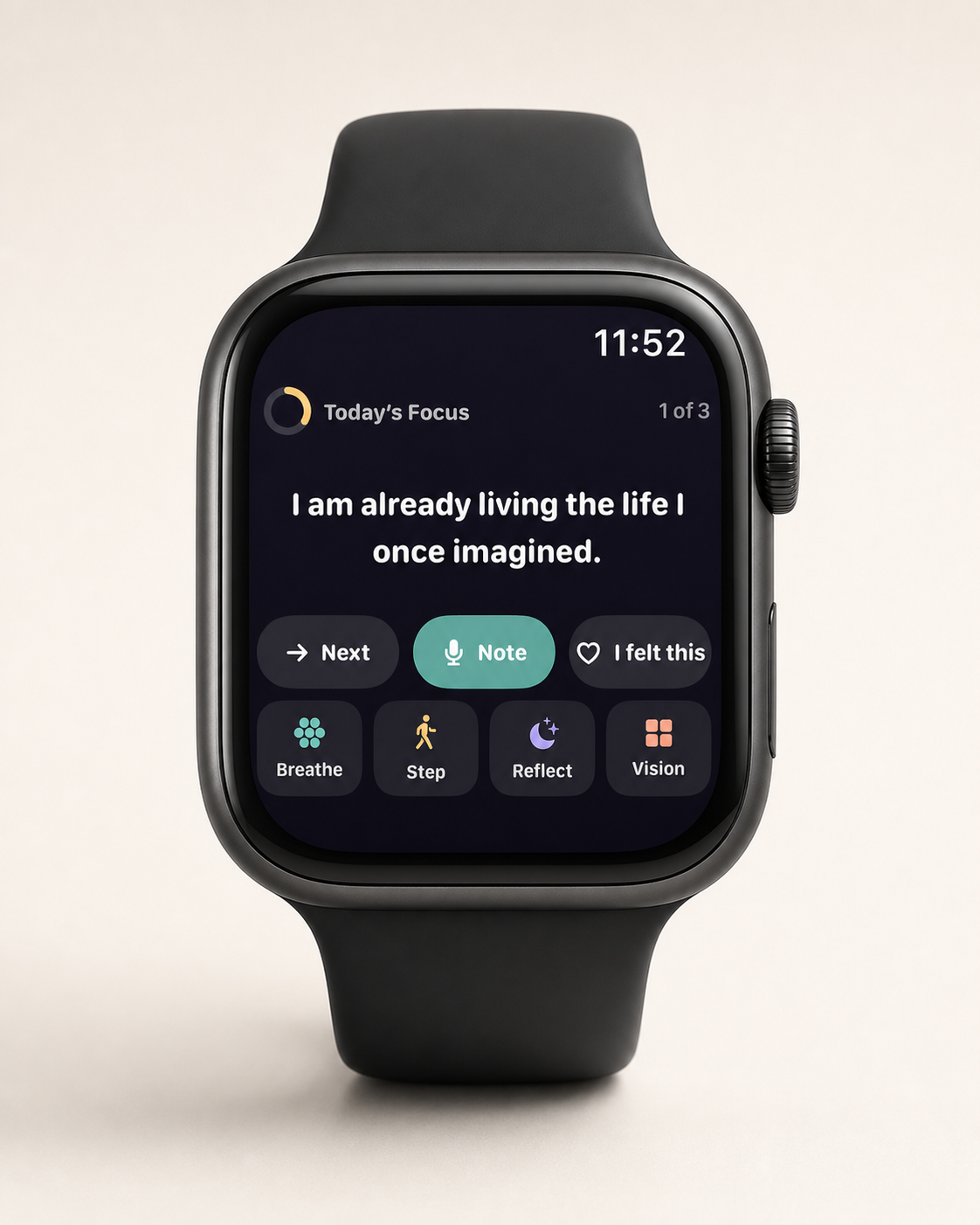
The short answer
MyDirection includes a native Apple Watch app, watch face complications and iPhone widgets. Today's focus line and today's step are glanceable in about three seconds, and you can log a quick signal from the wrist and write the fuller reflection later on iPhone.
Why the wrist is the right surface for this
Think about when you actually need a reminder of your direction. It is the walk between the car and the meeting. The queue where you would otherwise open a social app. The ninety seconds before a conversation you have been putting off. The moment your hand reaches for a phone out of habit rather than intent.
None of those are moments when you sit down and open a goals app. All of them are moments when you can glance at your wrist. That is the entire argument for the Watch surface, and it is why MyDirection treats the Watch as a first-class part of the practice rather than a shrunken port of the phone screen.
There is a second effect that is harder to design for but reliably reported, which is that seeing your intention right before a decision changes the decision more often than seeing it that morning did. Proximity to the choice matters more than repetition.
What you see on the Watch
- Today's line. The single focus sentence from your board, readable in a glance.
- Today's step. The one action you committed to, so you do not need to remember what you decided at 7am.
- A quick signal. A one-tap way to record that something landed, or that today went sideways.
- Complications. Your line or step on the watch face itself, so it is present without opening the app.
What you will not find is a shrunken vision board. A wall of thumbnails on a 45mm screen is decorative rather than useful, and it takes longer than the three seconds a wrist glance actually gets. The Watch shows one thing on purpose.
The Watch app reads from the same on-device store as the iPhone app, through a shared app group. Nothing is fetched from a server to render your direction on your wrist.
Widgets, complications and the Lock Screen
The same design principle applies to iPhone. MyDirection offers Lock Screen and Home Screen widgets showing today's line and step. On a normal day you will see your Lock Screen dozens of times without deciding to, which makes it a better location for a direction than any screen you have to navigate to.
This is where a digital board decisively beats a physical one. A board on your bedroom wall is seen twice a day, in the two moments you are least able to act on it. A line on your Lock Screen is present at the moments when a choice is actually in front of you. See digital vs physical vision boards for the full comparison, including where the physical board wins.
Reflect without friction
Logging a signal from the Watch takes one tap. That is deliberately low effort, because the alternative is not a thoughtful long-form entry. It is nothing at all. A tap recorded at the moment something happened is worth more than a detailed reconstruction you never write.
The fuller evening reflection lives on iPhone, where typing is realistic. The two surfaces divide the work along the line of what each is good at, so the Watch captures signal in the moment, the phone captures meaning afterwards.
Setting it up in about five minutes
- Install MyDirection on iPhone and complete setup there. Your direction, your images and your privacy mode all live on the phone.
- Open the Watch app on iPhone, scroll to MyDirection and confirm it is installed on your watch. On most setups it installs automatically.
- Long-press your watch face, tap Edit, and add the MyDirection complication to a slot you actually look at. The corner slots on Infograph and the centre of Modular both work well.
- Choose the complication style, either the line itself if you want the content present, or the compact version if you would rather keep it one tap away.
- In MyDirection on iPhone, set your two daily nudge times. Two is the ceiling, not a starting point.
- Run one full day before adjusting anything. The first day's line is the least personal one you will get, which is not a reason to change the setup.
If you are not sure the wrist suits you, test the idea first with Reminders or Shortcuts before paying for anything, the Apple Watch guide has both builds written out.
What we chose not to put on the wrist
The temptation with a Watch app is to port the phone. Nearly everything we tried that way made the practice worse.
- The board itself. A grid of thumbnails at 45mm is decorative and unreadable in the two seconds a glance actually gets.
- Long generated guidance. One sentence works on a wrist. Three paragraphs is a scroll, and a scroll is a session.
- Dictated reflections. Speaking your private reflection aloud is a privacy problem in every shared space, which is most of them.
- History browsing. Navigation-heavy tasks belong on a screen you are already holding.
- Activity-style rings or scores. Gamifying a reflective practice turns it into a performance you can fail at.
- Frequent haptic nudges. A wrist buzz is physical and interrupts mid-sentence. Get the frequency wrong and users disable notifications, taking the practice with them.
What remains is small on purpose, just one line, one step and one tap. The Watch is a delivery surface for the smallest useful unit of the practice, and everything requiring thought stays on the phone.
The five moments a wrist glance actually changes something
It helps to know in advance where this pays off, because the value is concentrated in a handful of recurring moments rather than spread evenly through the day.
- The corridor before a meeting
- Ninety seconds where you are already thinking about what is coming. A glance here reframes what you are walking in to do.
- The queue
- The default is to open something. A complication gives you a two-second alternative that is on your side.
- The gap between tasks
- The moment a piece of work finishes and the next thing is undecided. This is where the day gets quietly reallocated.
- Before the conversation you are avoiding
- The single highest-value moment. Your intention arriving here changes the first sentence you say.
- The end of the working day
- Where the step either happens or gets deferred to a tomorrow that arrives just as full.
Notice that none of these are moments you would open an app. That is the argument in full, that the value is entirely in the delivery, and the delivery only works on a surface you do not have to choose to visit.
Practicalities and limits
The Watch app is included in the subscription. There is no separate purchase and no tier that unlocks it. It requires the iPhone app, because your board and history live on the phone and the Watch reads from the shared store.
Reminders are lightweight and configurable. The default is deliberately restrained. This is a practice, not an engagement product, and an app that buzzes your wrist to increase session count is optimising for the wrong thing. If notifications from MyDirection ever feel like a growth tactic rather than a nudge, that is a bug.
A practical note on privacy is that what appears on your wrist is visible to whoever is standing next to you. If your direction is something you would rather not have read over your shoulder, the complications can be turned off while keeping the Watch app itself.
Common questions
Is the Apple Watch app included?
Yes, in every plan. There is no separate purchase and no tier that unlocks it.
Do I need my iPhone nearby?
The Watch app reads content synced from the iPhone through a shared app group. Your board and history live on the phone.
Can I complete the daily practice entirely on the Watch?
You can see today's line, see your step and log a quick signal. The fuller evening reflection is designed for the phone.
Are there watch face complications?
Yes. You can put today's line or step directly on the face so it is present without opening anything.
Does it drain the battery?
The app is glance-shaped rather than continuously active. There is no background tracking, no location monitoring and no persistent session.
For iPhone and Apple Watch
Keep your vision close.
Become it daily.
MyDirection is a paid subscription with a 3-day free trial. Cancel any time before the trial ends and you are not charged.
See pricing and trial