
A board that listens
The manifestation and vision board app that changes with you
Not a collage you forget. A board that reads your own record and rewrites what it shows you.
See pricing and trial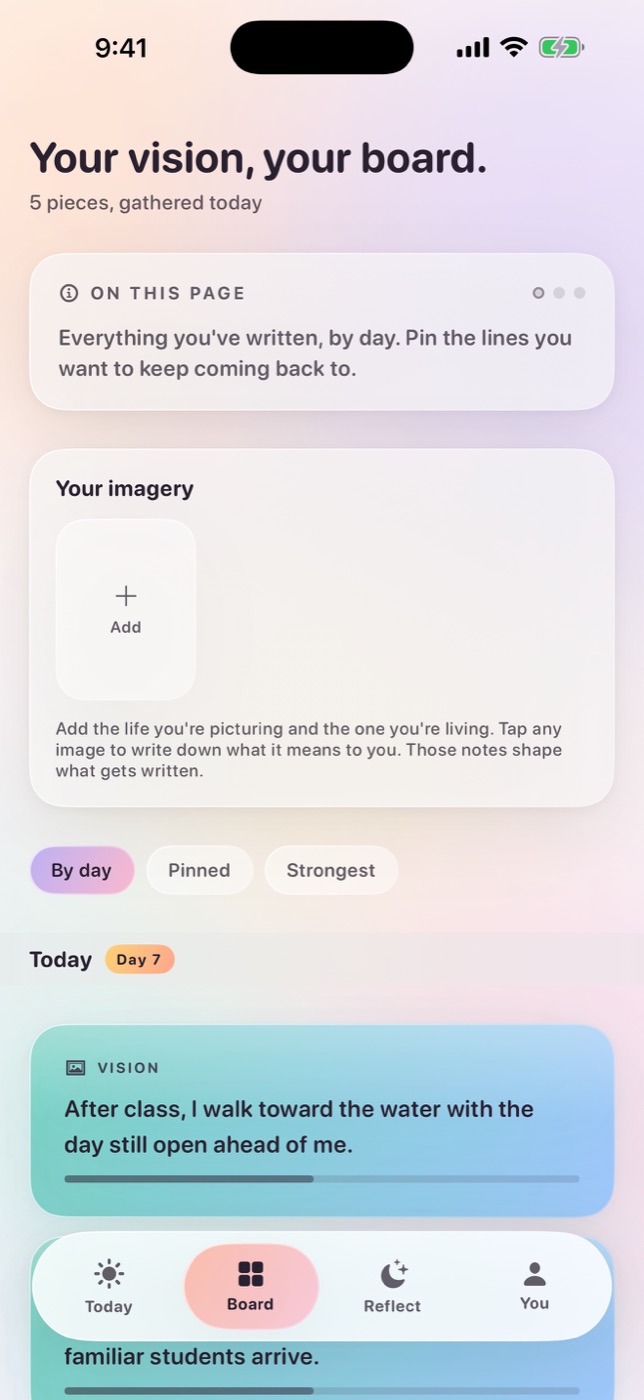
The short answer
MyDirection is a manifestation and vision board app for iPhone and Apple Watch. You build a board from your own photos and words, then run a one-minute manifestation practice around it. The board adapts based on which lines land, which steps you complete and what you write in the evening.
Your imagery, in one living board
The board starts the way every vision board starts, with images that make an abstract direction feel specific. Your own photos work best. The point of a vision board is not decoration, it is recognition. A picture of a place you have actually stood does something a stock photograph cannot, because your memory is doing half the work.
Alongside the imagery you pin the words that matter, like the phrase that describes the direction, the sentence someone said that stuck, the constraint you keep forgetting. Over the following weeks, MyDirection surfaces different parts of the board at different moments rather than showing you the whole thing at once. A board you see entirely, every day, becomes invisible within a fortnight. A board that shows you one relevant thing does not.
Photo images stay on your device. They are never uploaded for generation, in either privacy mode, and MyDirection does not generate images of your imagined future, see why that decision was made.
Built around action, not wishful thinking
A vision board on its own is an attention tool. It makes a goal easier to notice, which is genuinely useful and considerably less than what the category usually promises. What it cannot do by itself is change a decision, and decisions are where directions are actually built or lost.
So MyDirection pairs the board with one aligned step per day and a short evening reflection. The imagery supplies the pull; the step supplies the movement; the reflection supplies the correction. Take any one out and the practice degenerates into something familiar, imagery alone becomes daydreaming, steps alone become a task app, reflection alone becomes a journal you stop opening.
The full mechanism is described in how MyDirection works, and the general technique, independent of any app, is in turning a vision board into daily action.
Evidence changes the picture
Most vision boards describe a future. MyDirection also records a present. As you log evidence (things that actually happened, including the ones that did not go well) the board becomes a document of movement rather than only desire.
This changes what the board is for. On a bad week, a board of aspirational images is a reminder of distance, and it makes you feel worse. A board that also contains eleven specific things you did in the last month is a different object entirely. It is evidence, and evidence is the thing that holds when motivation is unavailable.
It also keeps the board grounded. Evidence that contradicts the plan (the channel that produced nothing, the routine that never survived a real week) is recorded too, and that is what allows the direction to be corrected rather than merely endured. See how to track evidence without forcing positivity.
What makes it adaptive rather than editable
Almost every vision board app lets you edit your board. That is not the same as adapting, and the distinction is the whole product. Editing means you must notice that something has changed, decide what to do about it, and do the work. Adapting means the board responds to signals you are already producing.
| A static or editable board | MyDirection | |
|---|---|---|
| Changes when | You remember to change it | Your reflections and choices change |
| Knows what you did | No | Yes, completed and abandoned steps |
| Knows what landed | No | Yes, which lines you engaged with |
| Surfaces | The whole board, always | The relevant part, at the relevant moment |
| Asks whether the goal still fits | Never | When the pattern suggests drift |
| Contains evidence | Rarely | By design |
The learning decays, so recent behaviour outweighs old behaviour. That is deliberate, because a goal is a moving object, and a system that keeps optimising for the person you were in March is worse than no system at all.
Close on iPhone and Apple Watch
MyDirection is a native iPhone and Apple Watch app. That means Lock Screen and Home Screen widgets that show today's line without opening anything, Watch complications for a glance mid-conversation, and a Watch app for logging a signal when something lands.
Widgets are the most underrated feature in this whole category. A board inside an app is a board you must decide to look at. A board on your Lock Screen is a board you see forty times a day without deciding anything. The trade is that the widget must show one useful thing rather than a wall of thumbnails, which is why MyDirection surfaces a single line rather than a shrunken collage.
More on the wrist experience specifically in MyDirection on Apple Watch and manifestation on Apple Watch.
How it compares to the alternatives
Before paying for anything, it is worth knowing what the free and physical alternatives actually give you, and what a subscription is adding on top.
| Photos album as wallpaper | Physical board | Collage app | MyDirection | |
|---|---|---|---|---|
| Cost | Free | Materials only | Often free or one-off | $59.99/yr or $19.99/mo |
| Visible where decisions happen | Yes | No | Only if you open it | Yes |
| Ritual of making it | No | Strong | Some | Some |
| Attached daily practice | No | No | Rarely | Yes |
| Records what you did | No | No | No | Yes |
| Changes without you editing | No | No | No | Yes |
| Asks whether the goal still fits | No | No | No | Yes |
| Explicit privacy mode choice | N/A | N/A | Rarely | Yes |
The clear reading of that table is that the first two columns cover the visibility problem for nothing, and the last two rows are what you would actually be paying for. If the daily loop and the adaptation do not sound like what you are missing, the free version is the better buy and we would rather you took it.
A privacy choice made before you write
Before you write anything, MyDirection asks how you want your content handled, offering private writing that keeps supported generation on your iPhone, or secure AI personalization that sends the text needed to write your guidance. Both modes are included at every price. Privacy is not a premium tier here.
Photo images are never uploaded for generation either way. Analytics is off until you switch it on. Nothing you write is sold or used for advertising, and generation requests are sent with training disabled and zero data retention. The specifics, including the categories of text a personalized request contains, are on the privacy page.
The three signals the board reads
"It learns from you" is a claim worth breaking down, because in this category it usually means very little. MyDirection reads exactly three things, and each changes something specific.
- Response
- Which lines you engage with, skip, or mark as not landing. This shifts the register and subject of what surfaces next. It is the cheapest signal to collect and the easiest to over-read. A skip often just means you were late.
- Behaviour
- Which steps you completed, which you abandoned, and how large they were. This is what makes the suggestions realistic, and it is usually the first change people notice, since by day four the app has stopped proposing the two-hour version of everything.
- Reflection
- What you wrote in the evening and how aligned you rated the day. The highest-value signal by a distance, because it is the only one that carries why. It determines which part of your direction surfaces and when the app asks whether the goal still fits.
The learning decays, so the last three weeks weigh more than the three months before them. That is deliberate, because a system still optimising for the person you were in March is worse than no system, because it is confidently wrong rather than merely absent.
What the first week actually looks like
Product pages tend to describe capabilities rather than experience, which makes it hard to judge whether something will fit your life. So here is the week, plainly.
- Day one, about fifteen minutes. You write your direction in one sentence, choose the tone you want the app to write in, pick your privacy mode, and add somewhere between six and fifteen images from your own library. The setup is deliberately not a life audit. One direction, not eight categories.
- Day two. The first real loop. A line appears in the morning, you pick a step, you rate the evening. The line will be broadly relevant rather than specific, because the app knows almost nothing about you yet. This is the flattest day of the whole experience and it is worth knowing in advance.
- Days three to five. The steps start being sized more realistically because the app has seen what you finish. Most people discover here that their first step size was roughly double what their day can actually absorb.
- Days six and seven. The evening prompt begins to vary based on your pattern, asking about friction after a stall, about step size after a good run. The first weekly review gives you seven entries to read in one sitting, which is where most people notice something they had not.
- Week two onward. The board begins surfacing different parts of itself, and the language starts drawing on your own phrasing. This is the point at which it stops feeling like a template.
The important caveat is that the 3-day trial covers days one to three, which is the least impressive stretch. Adaptation needs input, and three reflections is not enough input to adapt to. If what you want to evaluate is specifically whether the board changes in an interesting way, a trial structurally cannot show you that, see our pricing page, where we say the same thing.
What we deliberately did not build
A product is defined as much by its omissions, and several of ours are choices we get asked about often enough to explain here.
- No streak counter
- Streaks convert a practice into a score, and the moment you break one the rational move is to stop playing. MyDirection records what happened without grading you on it. The record is more useful than the shame.
- No AI image generation
- Generating a picture of your imagined future is a striking demo. It also requires sending a description of your private hopes to an image model, and it replaces the recognition value of a photograph you actually chose with something generically attractive.
- No social layer
- No sharing, no feed, no accountability partners. Reflection is only useful when it is unfiltered, and that does not survive an audience, even a small one.
- No multiple boards
- One direction at a time. Two directions produce two half-practices and an ambiguous daily step, and an ambiguous step is one you do not take.
- No free tier
- A free tier has to be funded by advertising, by data, or by a paywall placed exactly where the app becomes useful. All three change what the product is for.
- No engagement notifications
- Two nudges a day at most, and none of them say "you haven't opened the app." If a notification ever feels like a growth tactic, that is a bug rather than a strategy.
Who this is for, and who it is not
MyDirection fits people who have tried a board or a journal, found the first fortnight energising and the rest of it silent, and suspect the problem is that nothing was listening. It fits people who want one clear direction rather than a life dashboard, and who would rather spend three minutes a day for a year than an hour once.
It does not fit everyone, and here is who should look elsewhere.
- You want a beautiful collage to print or share. MyDirection's board is a working surface, not a poster. A dedicated collage app will do it better.
- You want AI to generate images of your future. We do not do this on purpose. Several apps do it well.
- You want guided meditations or narrated audio. The focus practice is a minute of text and breath, not an audio programme.
- You want a full journal with tags, search and long-form entries. The reflection is deliberately short.
- You are on Android. There is no Android version, and the on-device model, widgets and Watch app do not port.
- You are looking for something free. MyDirection is a paid subscription with a 3-day trial and no free tier.
If several of those describe you, how to choose a manifestation app compares the approaches without putting ours first.
Common questions
Can I use my own photos?
Yes, and it is the recommended approach. Your own images produce recognition rather than aspiration, which is what makes a board keep working. They stay on your device.
Can I have more than one board?
The practice is built around one direction at a time, so one active board. This is a design constraint rather than a limitation we plan to remove.
Does it have widgets?
Yes. Lock Screen and Home Screen widgets on iPhone, plus Apple Watch complications, showing today's line and step.
Does the board work offline?
Yes. Your board, reflections and evidence are stored on the device. In private writing mode the whole daily loop works with no connection at all.
Is this a manifestation app or a goal app?
Both descriptions fit, and neither is complete. It uses the imagery and daily-ritual format of a manifestation practice with the mechanics of goal-setting research, meaning specificity, implementation intentions, reflection and evidence.
How much does it cost?
$7.99 per week, $19.99 per month or $59.99 per year on the US App Store, with a 3-day free trial for eligible new subscribers. No free tier, no ads.
For iPhone and Apple Watch
Keep your vision close.
Become it daily.
MyDirection is a paid subscription with a 3-day free trial. Cancel any time before the trial ends and you are not charged.
See pricing and trial